
Vitae · Study planner for iPhone
Know what to study today.
Vitae is an iOS study planner for students preparing for one or several exams. Plan around exam dates and available time, see today's recommended session and track your study hours. The planner, exam tracking and Pomodoro timer are free and work offline on iPhone and iPad.
Biology
90 minYour Biology Final Exam is in 3 days.
Start with one subject and one exam
Add a subject, an exam date and a study-hours target. Choose your available days, review the suggested weekly plan and start your first session. You can edit the plan and choose a different subject; a recommendation helps organise your time, but does not measure what you have learned.
See the planner and exam tracking


Free and Premium
Try the study planner, exam tracking and Pomodoro timer without buying Premium. The optional one-time purchase unlocks the additional sessions, sounds, themes and detailed statistics listed below. Check the App Store for the current Premium price in your region.
- Free planner, exam mode, subjects, Pomodoro, three guided sessions, two custom sessions, three ambient sounds, streak and weekly goal
- Premium full guided session library, unlimited custom sessions, every ambient sound, the two premium themes, detailed progress statistics
- One-time purchase for lifetime access, no subscription, no ads
How it works
Add your exams
Your subjects, your exams and their dates, the days and hours you're actually free, and how long you usually study. You can adjust these settings later.
Review your study plan
Vitae places study blocks across your available slots and shows them in a weekly planner and a calendar. Everything stays editable: move a block, change its subject, delete it, or regenerate the week.
See today's recommendation
The home screen recommends a subject, a duration and a timer mode, with the reason written underneath: an exam in six days, a block you planned for 14:00, a subject you haven't touched this week.
Start a study session
The session runs with a Pomodoro timer if you want one, ambient sound underneath, and binaural audio if you're wearing headphones. No further decisions to make.
Track your progress
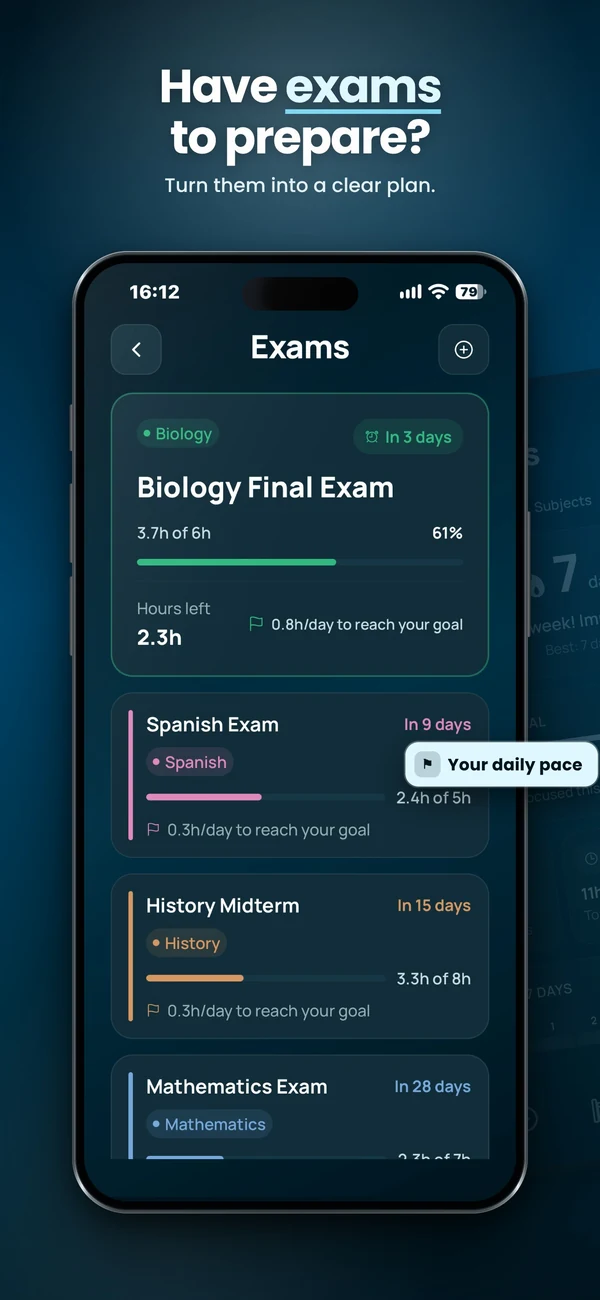
Completed sessions contribute to your weekly goal and streak. Exam Mode shows study hours completed and remaining against the target you set. Detailed subject statistics require Premium. Time logged helps you review the plan; it does not measure mastery of a topic.
What Vitae does
Study planner
A weekly schedule built from the days and hours you said you were free. Blocks carry a subject, a duration and a timer mode, and you can reshuffle any of it. Free for everyone.
Exam mode
Add an exam with a date and a target number of hours. You get days remaining, hours done, hours left, and the daily target that keeps you on schedule. Free for everyone. See what a good exam countdown app should track.
The recommendation
One session, chosen by a fixed order of priorities: near exams first, then today's planned block, then your weekly goal, then your least-studied subject, then your habit. The reason is always shown. Read more on how to know what to study today.
Guided focus sessions
Multi-step sessions for different moments: study flow, exam focus, a sprint block, a recovery break between two long sessions. Three are free, the rest come with Premium.
Subjects and progress
Organise your subjects for free and track each exam against its study-hours target. Detailed progress statistics, including minutes per subject and session history, require Premium.
Streaks and weekly goal
Set a number of sessions per week and keep a daily streak going. An optional local reminder nudges you at a time you choose, if you want one.
And the focus layer around it
Pomodoro timer
Focus blocks alternating with short breaks and a longer break every four cycles, layered onto any session. Free for everyone. More on choosing a study timer for iPhone.
Ambient sounds
Rain, waves, forest, fire, wind, coffee shop, thunder and night, mixed under the session at whatever volume you like. Three are free.
Binaural audio
Optional. Two slightly different frequencies, one per ear, that your brain resolves into a third perceived tone. Some people find it helps them settle in; it needs headphones, and the rest of the app works fine without it. See binaural beats for studying on iPhone.
Works offline
Audio ships with the app, your plan and stats live on your device, and reminders are local notifications. No connection needed to study.
Frequently Asked Questions
How does Vitae decide what to recommend?
It follows a fixed set of rules, in order of priority: an exam coming up in the next ten days that still has hours left against its target, then a study block you planned for today that hasn't started, then your weekly session goal if you're behind, then the subject you've studied least this week, then your usual study habit. The card always shows which rule it used, so you can see the reasoning rather than trust it blindly.
Does Vitae use AI?
No. Nothing is sent to a model and nothing is predicted. The recommendation is a short list of rules applied to data you entered yourself: your subjects, your exams, your availability and your session history. That is also why it works with no connection.
Do I have to plan my whole week by hand?
No. During setup you pick your subjects, add any exams, select the days and time range when you can study, and choose a usual session length. Vitae places study blocks in your week from that. You can edit, move or delete any block afterwards, add blocks manually, or regenerate the week.
How does Exam Mode work?
You add an exam with its date, a subject and a target number of study hours. Vitae then shows days remaining, hours studied so far, hours left and the daily target needed to reach your goal. Exams within ten days take priority in the session recommendation.
Is the planner behind the paywall?
No. The study planner, Exam Mode, the Pomodoro timer and unlimited subjects are free for everyone. Premium is about the session library and the audio around it, not about the planning.
What does Premium unlock?
The full guided session library (three sessions are free), unlimited custom sessions (two are free), every ambient sound (the first three are free), the two premium themes, and the detailed progress statistics. It is a single one-time purchase for lifetime access, not a subscription.
Do I need headphones?
Only for the binaural layer, which relies on each ear receiving a slightly different frequency. The planner, the sessions, the Pomodoro timer and the ambient sounds all work on a speaker.
Does Vitae work without an internet connection?
Yes. Audio is bundled with the app, your plan and statistics are stored on your device, and session reminders are local notifications. Studying does not require a connection once the app is installed. Downloading updates, buying or restoring Premium and sending usage analytics use a connection. Vitae does not offer cross-device sync.
What languages does Vitae support?
English, French, German, Spanish, Italian, Portuguese and Japanese. You can switch language in Settings and the change applies immediately.
Who it's for
- Students with exams on the calendar who need their revision spread across the weeks that are left
- Anyone juggling several subjects and losing time deciding which one comes first
- People who start well and drift after two weeks, and want a weekly goal and a streak to hold the rhythm
- Anyone who works better with structure around a session: a timer, a sound, a clear end
Why Vitae
- Planning and exam tracking are free, not a paywalled hook
- One-time purchase for Premium, no subscription, no ads
- No account to create, and your plan stays on your device
- Every recommendation shows its reason, so nothing is a black box
- Available in English, French, German, Spanish, Italian, Portuguese and Japanese
Read more: Best study planner apps for iPhone · Best exam countdown app for iPhone · Best study timer for iPhone · How to know what to study today · How to plan revision for exams · Binaural beats for studying on iPhone
Read more: Best study apps in 2026 · Vitae vs Brain.fm · How to plan a study week · Best offline study apps
Prefer to plan on paper or in a spreadsheet first? Download the free study-week template. It is a simple CSV you can open in Numbers, Excel, Google Sheets, or any spreadsheet app.