The best study timer for iPhone
Choose an iPhone study timer for your routine: a countdown, repeated focus and break cycles, or sessions linked to subjects. Compare the controls and study records you need, then check alerts and background behaviour on your device.
I develop Vitae, which is mentioned in this guide.
In this guide
What a Pomodoro-style timer actually does
The classic pattern is a focus block, usually around 25 minutes, followed by a short break, with a longer break every four cycles. The structure works because it forces a stopping point before fatigue sets in, and because a break with a fixed end is easier to actually take than an open-ended one.
What to look for in a study timer on iPhone
- Keeps running in the background. A timer you have to keep the app open for is a timer you will forget about the moment you check a message.
- Notifies you when a block ends, without requiring you to watch the screen for it.
- Lets you adjust block and break length instead of locking you into exactly 25 and 5 minutes.
- Attaches to something, ideally a subject or a session, so the time you log means something afterward instead of disappearing once the timer resets.
The iPhone Clock app versus a dedicated study timer
The built-in Clock app can run a single countdown reliably, which covers the bare minimum. It has no concept of cycles, no automatic alternation between focus and break, and no memory of what the timer was for once it ends. A dedicated Pomodoro app adds the cycle structure. A study timer built into a planner goes one step further and ties the timer to an actual subject or session, so the time is recorded somewhere instead of vanishing.
Why pairing a timer with a plan changes what it is worth
A timer answers "how long." It does not answer "on what," which is usually the more expensive question: several subjects competing for the same hour, and an exam that makes one of them more urgent than the others today. In Vitae, the Pomodoro timer runs underneath whichever session the app recommended, so starting the timer and deciding what to study stop being two separate steps. Ambient sound and an optional binaural layer run under the same session if you want them. The timer itself is free for everyone.
A reasonable way to test one
- Run a normal study block with your current timer, whatever it is, and note whether you actually took the break or worked through it.
- Check whether the app kept the cycle going in the background or needed you to relaunch it.
- See whether the session left any record afterward, minutes, subject, date, or if it simply reset to zero.
- Decide whether "what to study" is a separate decision you are making every time, and whether that is the part actually costing you time.
Check wall-clock time as well as focus time
Two 25-minute blocks separated by one five-minute break occupy 55 minutes, not 50. With only 45 minutes before class, choose a shorter task and timer rather than promising two full blocks. Test the end alert once with the phone locked and your normal Focus settings. Record what you completed, not just the minutes. No particular interval guarantees concentration.
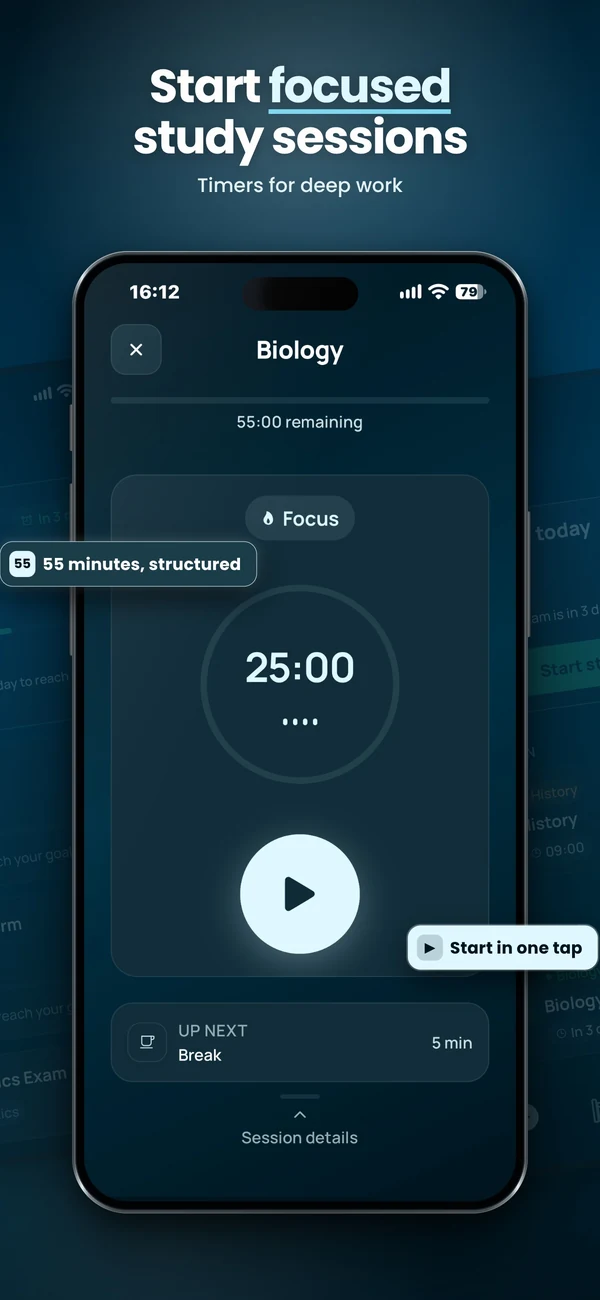
Plan and run a study session
Vitae brings subjects, exams, weekly planning and timed sessions together on iPhone. Core planning features are free, with an optional one-time Premium unlock.
Explore VitaeFrequently asked questions
What is the best study timer for iPhone?
The right one depends on whether you only need the clock or also want the time to mean something afterward. A dedicated Pomodoro app covers the cycle structure; a study timer built into a planner, like the one in Vitae, ties each block to a subject or a recommended session so the time is logged, not just counted.
Is the iPhone Clock app enough for studying?
It can run a single countdown, which is enough if you just want a fixed block of time. It has no automatic focus/break cycling and no memory of what the timer was for, so anything beyond a plain countdown needs a dedicated app.
How long should Pomodoro study sessions be?
25 minutes of focus with a 5 minute break is the traditional default, with a longer break every four cycles, but it is a starting point rather than a rule. Shorter or longer blocks both work; what matters more is whether you consistently take the break.