The best exam countdown app for iPhone
An exam countdown shows the time left before a deadline. To plan revision, also consider your study-hour target, completed sessions and available days. Vitae’s Exam Mode brings these indicators together; study hours alone do not establish readiness.
I develop Vitae, which is mentioned in this guide.
In this guide
What a plain countdown gives you, and what it leaves out
A days-left counter is easy to build and genuinely useful for a sense of urgency: six days feels different from three weeks. What it cannot tell you is whether the hours you have put in so far are anywhere near enough, because it has no concept of a study target in the first place. Two exams six days out are not the same situation if you have covered one thoroughly and barely started the other; a countdown treats them identically.
What a useful exam countdown app should track
- Days remaining, the baseline every countdown app already has.
- A target, a number of hours you have decided the exam is worth, set once when you add it.
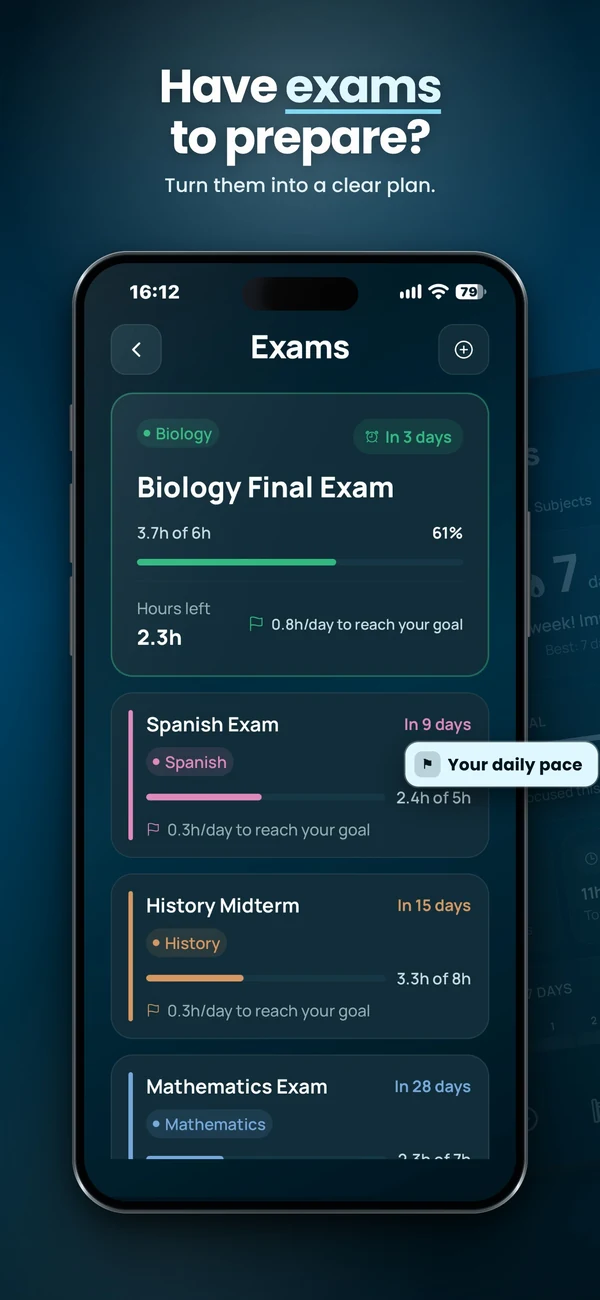
- Hours studied so far, tracked automatically from sessions rather than logged by hand.
- Hours left and a daily target, the number that turns "six days left" into "roughly 50 minutes a day to stay on pace."
- Priority against your other exams, since most students are not counting down to just one date.
How Vitae's Exam Mode works
You add an exam with its date, a subject and a target number of study hours. From there Vitae shows days remaining, hours studied, hours left, and the daily target needed to reach the goal, updated automatically as you complete sessions. Exams inside the next ten days take priority in the app's session recommendation, so an exam close enough to matter surfaces on the home screen instead of staying buried in a list. Exam Mode is free, and you can track more than one exam at a time, each with its own target.
Questions worth asking before you commit to a target
- Is the hour target realistic given everything else on your calendar for the same weeks, or is it copied from what worked for a different exam?
- Does the app recalculate the daily target as days pass, or does it stay fixed from the day you set it?
- If you fall behind, does the app adjust what it asks of you, or does it just let the gap grow silently?
- Can you see more than one exam at once, ranked by urgency, rather than switching between separate countdowns?
Turn days left into a realistic allocation
Illustrative calculation: you set an eight-hour preparation target, have logged three hours and have six study days left. Five hours remain, or 50 minutes per available day. If only three days are actually free, that becomes 100 minutes per study day. The target is an estimate: check practice results and revise it when the workload is unrealistic. A plain countdown remains enough if you only need the date.
Plan and run a study session
Vitae brings subjects, exams, weekly planning and timed sessions together on iPhone. Core planning features are free, with an optional one-time Premium unlock.
Explore VitaeFrequently asked questions
What does a good exam countdown app need, beyond days left?
A target you set for the exam, hours studied tracked against that target, hours left, and a daily target that updates as time passes. Without those, a countdown only tells you how much time is left, not whether you are using it.
Does Vitae just count down days?
No. Exam Mode adds a target number of hours to each exam, tracks hours studied automatically from your sessions, and shows hours left and a daily target. Exams within ten days also take priority in what the app recommends you study.
Can I track more than one exam at a time?
Yes. Each exam gets its own date, subject and hour target, and Vitae uses proximity across all of them, not just one, when deciding what to recommend.