How to plan revision for exams
Turn exam dates into a revision schedule by listing the material, estimating the work remaining and placing sessions in your available hours. Include practice questions and spaced review. Update the plan using your results, not only the hours logged.
I develop Vitae, which is mentioned in this guide.
In this guide
List every exam with a date and a rough scope
Start with the exams themselves: date, subject, and a rough sense of how much material each one covers. An exam covering a full semester and one covering three weeks of material are not the same planning problem, even if they fall on the same day.
Set an hour target per exam
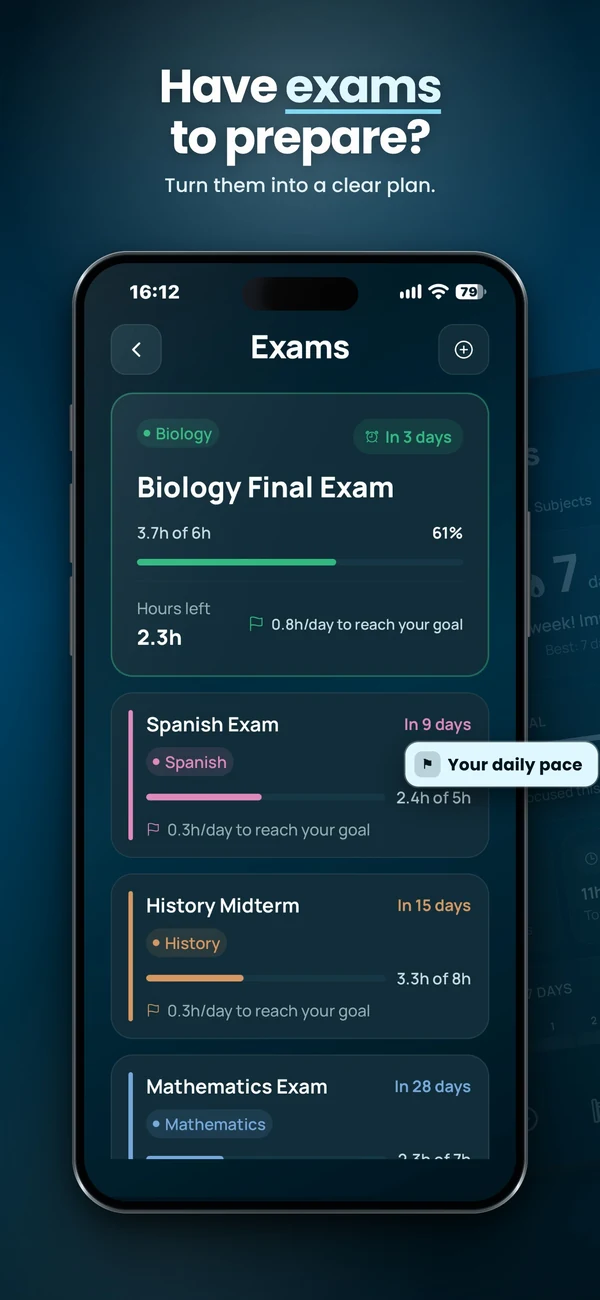
Attach a number of study hours to each exam, based on its scope and how comfortable you already are with the material, not a generic figure copied from somewhere else. This target is what turns a date into something measurable: without it, you can only track days remaining, not whether you are actually on pace.
Work backward from the exam date to today
Divide the target hours across the days between now and the exam, weighted toward the days you actually have free rather than spread evenly on a calendar. A target of 20 hours over two weeks is around 1.5 hours a day if you study every day, or closer to 3 hours on the days you actually have available if your week is uneven, which it usually is.
Balance urgency and readiness
Near exams deserve attention, but there is no universal ten-day threshold. Vitae uses a ten-day window in its recommendation rules; that is a product heuristic, not a learning-science rule. Consider readiness, difficulty and other deadlines before accepting the suggestion.
Practise retrieval and space revision
Use practice questions or recall without notes to check understanding, and revisit material across days. The Dunlosky review rates practice testing and distributed practice highly. Interleaving different problem types is distinct from merely switching school subjects; its usefulness depends on the material and task.
Recheck the target as the exam approaches
- Use practice results alongside hours logged.
- If you fall behind, check the remaining capacity and prioritise essential topics. Change the scope or target when it is unrealistic rather than automatically adding late-night hours.
- Move completed topics to shorter review sessions, leaving room for weaker areas.
A plan you can actually fit
Illustrative case: a 12-hour target with four hours already completed leaves eight hours. If you have six 90-minute slots before the exam, eight hours of revision plus one hour of buffer fits. If practice questions reveal a major gap, use that buffer or revise priorities; an app cannot create extra availability or establish mastery from the clock.
Plan multiple exams against the same available hours
Illustrative case: you have eight study hours before Friday’s biology exam, and a mathematics exam next Wednesday. Biology still needs five hours against your target; mathematics needs six. Do not allocate all eleven hours to the eight-hour window. Reserve five hours for biology and three for mathematics before Friday, then check that the remaining three mathematics hours fit before Wednesday. Keep breaks outside the study-hour total. If the remaining slots cannot fit the work, revise the target or scope and use practice results to choose priorities.
Check the combined timetable, not just each exam’s daily average: two individually reasonable targets can compete for the same evening. Use the weekly planning method to place real blocks, then choose today’s task. Vitae keeps multiple exam dates and hour targets alongside an editable weekly plan; review its recommendation against your current needs.
Plan and run a study session
Vitae brings subjects, exams, weekly planning and timed sessions together on iPhone. Core planning features are free, with an optional one-time Premium unlock.
Explore VitaeFrequently asked questions
How many hours should I plan per exam?
There is no universal figure; it depends on the exam's scope and how comfortable you already are with the material. What matters more than the exact number is setting one deliberately, so you can track hours studied against it rather than only counting days remaining.
What if I have several exams close together?
Give priority to whichever exam has the least slack between hours left and days remaining, not necessarily the earliest date. An exam six days out that is already on pace can wait behind one eight days out that is significantly behind its target.
Is alternating subjects the same as interleaving?
No. Interleaving usually involves mixing related problem types or skills. Simply changing subjects is a scheduling choice, not a guarantee of better learning.