Best study planner apps for iPhone in 2026
Compare Apple Calendar and Reminders, Todoist, Notion, paper and Vitae using one scenario with three exams. See how each approach records deadlines, allocates study time and tracks progress, with documented features and free-tier limits.
I develop Vitae, which is mentioned in this guide.
In this guide
Scope and method. Official documentation checked on October 20, 2026. This is a feature-based comparison, not a hands-on ranking. The worked example below is a suggested planning method; it is not a test result or a claim about every configuration of an app.
Choose the planning work you want help with
A calendar can be enough when you already know how to divide your revision time. A task manager helps you keep track of what needs doing. A workspace lets you build a system around your notes. A dedicated exam planner is useful when you want exam dates, availability, study sessions and hour targets together. None of these choices establishes that you have learned the material.
| Approach | Dates and work | Allocating study time | Progress record |
|---|---|---|---|
| Apple Calendar + Reminders | Events and scheduled reminders together | Choose your study blocks; events can be copied to another date | Completed reminders; keep a separate hours log if needed |
| Todoist | Tasks alongside Google or Outlook events | Calendar integration on all plans; visual time blocking on Pro/Business | Task activity; history depends on plan |
| Notion | Database dates, status and custom properties | Configure a calendar view and your own planning method | Status and numeric fields; formulas can calculate from your entries |
| Paper or a simple spreadsheet | A list of exams and tasks you maintain | Write an allocation and revise it when circumstances change | Tick tasks and enter hours yourself |
| Vitae | Subjects, exam dates and study-hour targets | Generates editable study blocks from your inputs and availability | Timed sessions feed exam-hour progress; detailed statistics are Premium |
These are ways to use the documented features, not a claim that other tools cannot be extended. Apple documents event times, alerts and copying events, while Todoist distinguishes its integration from its paid calendar layout. Notion offers calendar views and configurable fields, so it should not be treated as just a blank notes page.
One student, three exams, eight hours this week
Illustrative case: biology is in 10 days, mathematics in 17 and history in 24. Biology practice is going reasonably well; algebra needs work; history has not yet been checked. Four available study windows provide eight hours of actual study, with breaks allowed for separately.
One possible starting allocation is three hours of biology, three of mathematics and one of history, leaving one hour as a buffer. This is your planning decision, not a predicted app output or a recommended total for every student. Use a history practice task to check whether that allocation needs changing. The multiple-exam planning guide explains how to check all exam targets against the same available hours.
Calendar and reminders: place the blocks you choose
Record the three exam dates, add study blocks to the available windows and attach concrete tasks such as “attempt three algebra questions”. In Apple’s documented workflow, scheduled reminders can appear in Calendar and be marked complete there. Choose the next task from your plan; if you want hours-versus-target tracking, maintain a small log alongside it. Reuse entries where helpful instead of rebuilding every week from scratch.
Todoist: keep study tasks with the rest of your commitments
Create one project per subject and tasks with dates. Use the calendar integration to see other commitments alongside them; use the paid calendar layout if visual time blocking is useful to you. For this example, you still choose which tasks deserve the three biology hours and three mathematics hours. A completed task records work done, while an exam-hours log needs a defined method of its own. This does not assess every automation or third-party integration.
Notion or a manual system: define the fields you need
In Notion, one possible database has an exam date, preparation notes, target hours, completed hours and a status. Numeric properties and formulas can support a remaining-hours calculation; you supply the records and allocation rules. A calendar view helps you place dated items. On paper or in a simple spreadsheet, use the same headings and update them yourself. This approach fits someone who wants revision planning beside their notes and is comfortable maintaining the system.
Vitae: connect exam planning to the next session
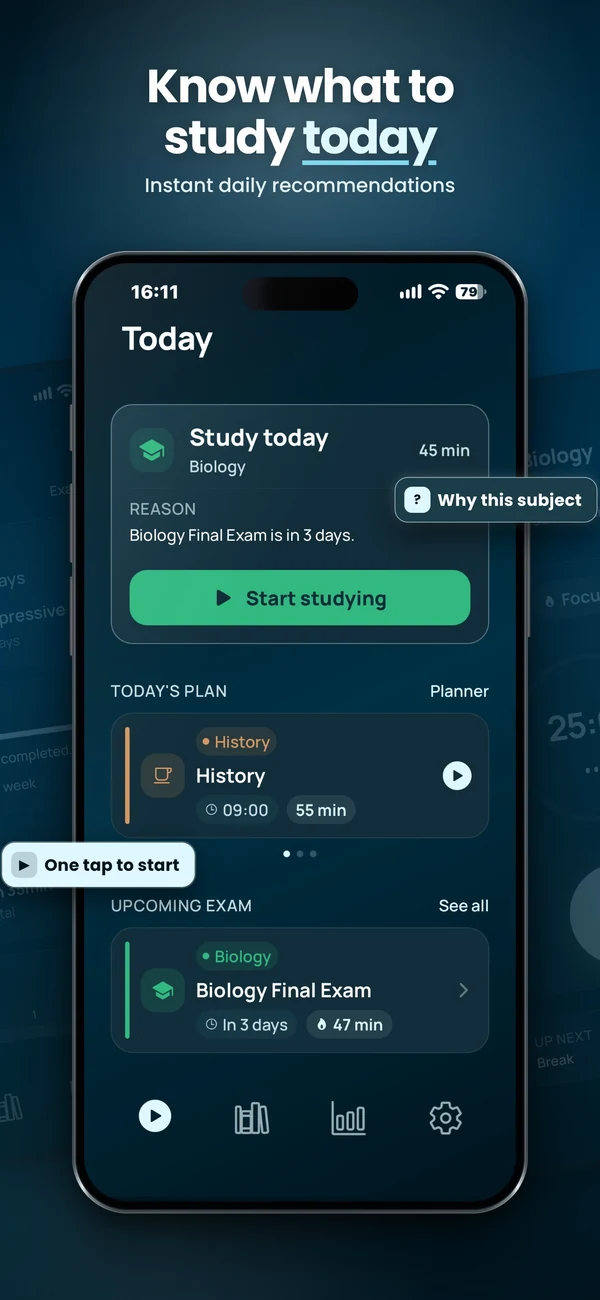
Add the subjects, dates, hour targets and availability, then review the generated weekly blocks. The home screen recommends a session with its reason; you can start a timed session and track study hours against an exam target. The example’s 3/3/1 allocation is not guaranteed to be the generated plan. Review the allocation across subjects rather than assuming an even split. Allow for breaks and complete session lengths: available time does not guarantee the same amount of scheduled study.
Vitae’s recommendation rules give priority to an exam within ten days that still has hours remaining against its target. Biology could therefore take priority even though algebra feels weaker. The app does not assess those practice results for you: review the reason and choose another session when appropriate. See how to decide what to study today.
When a dedicated exam planner is worth trying
Keep your existing calendar or task system if it already gives you a workable week and a clear next task. Try a dedicated planner when repeatedly distributing time between exams and recording study sessions is the part you want help with.
Vitae is intended for that exam-to-plan-to-session workflow on iPhone and iPad. Planning, Exam Mode, subjects and Pomodoro are free. Premium is an optional lifetime purchase for additional sessions, sounds, themes and detailed statistics. Its planning works offline; it does not offer cross-device sync. It is not an AI tutor and does not judge your answers or guarantee exam readiness. Check the App Store listing for device compatibility and your region’s purchase terms.
Check free limits and the price you will actually pay
- Apple: Calendar and Reminders are free downloads. You can try the workflow without buying a dedicated planner.
- Todoist: the Beginner plan includes five personal projects and one week of activity history. Calendar layout and task duration are paid features. The publisher’s standard Pro rates, checked October 20, 2026, are US$7 monthly or US$60 billed yearly (equivalent to US$5/month). Localized and App Store/legacy rates can differ; check your checkout.
- Notion: the Free plan has unlimited pages and blocks for an individual, a 5 MB limit per file and seven-day page history. Paid plans expand limits. Check the selected currency, billing cycle and workspace membership before comparing a paid quote.
- Vitae: free core planning with an optional one-time Premium unlock. Use the App Store price for your region rather than assuming another country’s amount applies.
Try your actual routine before choosing
- Devices: check where you need the plan. Todoist lists iPhone, iPad, Android, desktop and browser options; Notion documents iOS and Android apps as well as desktop and web access.
- Offline access: Todoist supports offline task edits after signing in, then syncs on reconnection. Notion lets all plans download pages in its mobile/desktop apps; important subpages need separate downloads. Test the exact pages and tasks you need. See the offline study guide for a practical check.
- Daily choice: can you identify a specific task now, and change it when practice shows a gap? A scheduled or completed hour is not evidence of mastery.
- A missed block: remove one of the example’s study windows. Can you revise the plan without hiding the shortfall? Use the weekly planning and revision-delay guide rather than squeezing all missed work into tomorrow.
See how Vitae handles exam planning
Review the planner, recommendation workflow and free/Premium features before deciding whether it fits your study routine.
Explore VitaeFrequently asked questions
Which study planner is best for several exams?
Choose by the work you need help with. A calendar or task manager can hold your deadlines and study tasks. Notion can support a custom database. Vitae combines exam-hour targets, editable planning and a suggested session. None of these tools establishes exam readiness.
Is Apple Calendar enough for revision?
It can be enough if you already choose your study blocks and track unfinished work. Scheduled reminders can appear in Calendar and be completed there. The example in this guide uses a separate log if you want to compare study hours against exam targets.
Can I plan revision without paying?
Yes. Apple Calendar and Reminders are free; Todoist and Notion have free plans with limits. Vitae’s planner, Exam Mode and Pomodoro are free, while detailed statistics and additional session and audio options require its optional one-time Premium unlock. Check current local terms before buying.
Sources and further reading
- Apple: reminders in Calendar; checked October 20, 2026
- Apple: event times, alerts and copying; checked October 20, 2026
- Apple Calendar: availability and free download; checked October 20, 2026
- Apple Reminders: availability and free download; checked October 20, 2026
- Todoist: calendar integration versus calendar layout; checked October 20, 2026
- Todoist: plan features and free limits; checked October 20, 2026
- Todoist: standard Pro rates and regional differences; checked October 20, 2026
- Todoist: offline tasks and synchronization; checked October 20, 2026
- Todoist: supported devices; checked October 20, 2026
- Notion: date, status, number and formula properties; checked October 20, 2026
- Notion: database calendar views; checked October 20, 2026
- Notion: plans and individual Free limits; checked October 20, 2026
- Notion: offline pages and download limits; checked October 20, 2026
- Notion: mobile access and desktop/web differences; checked October 20, 2026
- Vitae: App Store listing; checked October 20, 2026