
TravelBudget · Travel budget app for iPhone
Know what you can spend today.
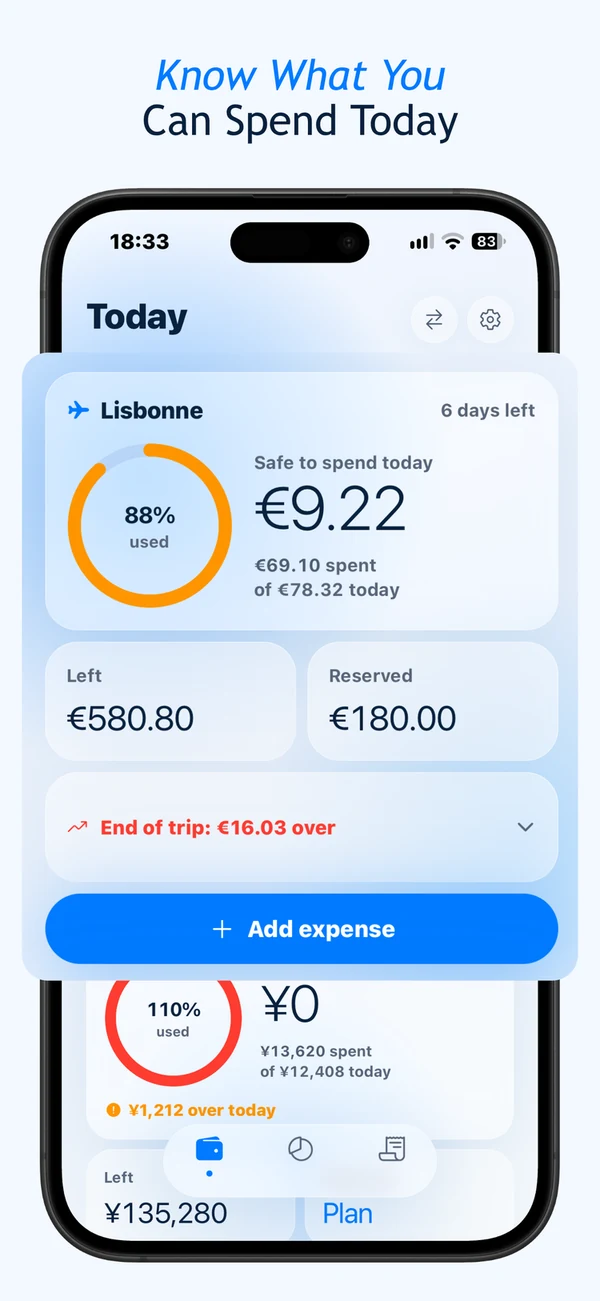
TravelBudget turns your spending, planned costs and days left into one clear number: what you can safely spend today.
Built around one question: what can I spend today?
Every trip has the same worry: will the money last until the end? TravelBudget answers it every day. It takes what you've already spent, what's still reserved for planned costs, and how many days are left, and turns that into a stable daily amount, so you're not redoing the math in your head at every purchase.
Getting started
Set your trip budget
Choose a total, your home currency, and how many days the trip lasts.
Reserve what you already know
Add planned costs, hotel, train, tours, so they're set aside before you land.
Check Safe to Spend, log as you go
One number tells you what's left for today. Logging a purchase updates it instantly.
What's inside
Safe to Spend, every day
A stable daily allowance, not a raw division of what's left, so one big purchase doesn't quietly eat into tomorrow.
Planned expenses reserved upfront
Known costs like a hotel or a flight are set aside the moment you add them, before you actually pay for them.
Quick expense logging
Amount, category, currency: logged in a few seconds, reflected in your Safe to Spend right away.
Multi-currency conversion
Log an expense in any currency; it converts to your trip currency automatically.
Category breakdowns
See spending by food, transport, lodging, and activities to spot where the budget is going.
Fully offline
Works with no signal, at the border, or mid-flight. No cloud sync required.
See it in action


Frequently Asked Questions
What does "Safe to Spend" mean?
It's how much you can spend today without putting the rest of your trip at risk. TravelBudget takes what you've already spent, what's still reserved for planned costs like a hotel or a train, and how many days are left, and turns that into a single daily number.
How is Safe to Spend different from just dividing my budget by the days left?
TravelBudget sets a stable amount for the day so a purchase in the morning doesn't silently shrink what you see in the evening. Whatever you don't spend today is redistributed automatically across your remaining days once the next day starts, not recalculated after every entry.
What happens to costs I already know about, like a hotel or a flight?
Add them as planned expenses and TravelBudget reserves the full amount right away, so your daily Safe to Spend already accounts for them. When you actually pay, mark it as paid: if the real amount differs from what you planned, your daily allowance adjusts by the difference.
Do I need to create an account to use TravelBudget?
No. TravelBudget works fully without an account. All your trip and expense data stays on your device.
How does multi-currency tracking work?
When you log an expense in a foreign currency, TravelBudget converts it automatically into your trip's reference currency using cached exchange rates, so your Safe to Spend number always reflects a single, consistent view of your budget.
Does TravelBudget work without an internet connection abroad?
Yes. Exchange rates are cached the last time you had a connection, and all core features, logging expenses, checking Safe to Spend, work fully offline.
Is my financial data stored in the cloud?
No. TravelBudget stores everything locally on your device. There is no account, sync, or cloud backend involved.
What if my trip has no fixed end date?
You can still track a budget without an end date, though the daily Safe to Spend calculation needs a trip length to work from, so it adjusts or hides depending on whether an end date is set.
Who it's for
- Solo travelers who want a daily answer, not a spreadsheet, to "can I afford this?"
- Backpackers keeping a long trip on budget without checking in constantly
- Digital nomads managing a monthly budget across borders
- Anyone on a fixed trip budget who'd rather know today's number than guess
Why TravelBudget
Planning a trip? Read How to budget a trip or how to track expenses while traveling. You can also download a free travel-budget template to sketch the categories before you leave.
- No account or signup required
- Free to use, or a one-time Pro unlock, never a subscription
- No ads or tracking inside the app
- About 30 MB, opens instantly
Practical guides
Explore the methods, examples and limitations behind this product.